Creality K1C 3D Printer Specifications Explained In Practical Terms
Understanding specs becomes easier when translated into real results. This guide explains how the Creality K1C performs beyond numbers.
Recent Blogs
-
Your Guide to Pebblebee Tracker Devices and Smart Item Protection
-
Unlock Precision Woodworking with FindBuyTool
-
How Protyre is Making Car Maintenance Faster and Easier
-
A Neutral Look at Unique Vintage and Its Classic Fashion
-
Beste Cadeau voor Moederdag Dat Echt Speciaal Voelt
-
Planning the Perfect Short Trip to Paris
-
Airport Outfit Guide: How to Look Stylish and Stay Comfortable
By Admin
·March 26 22
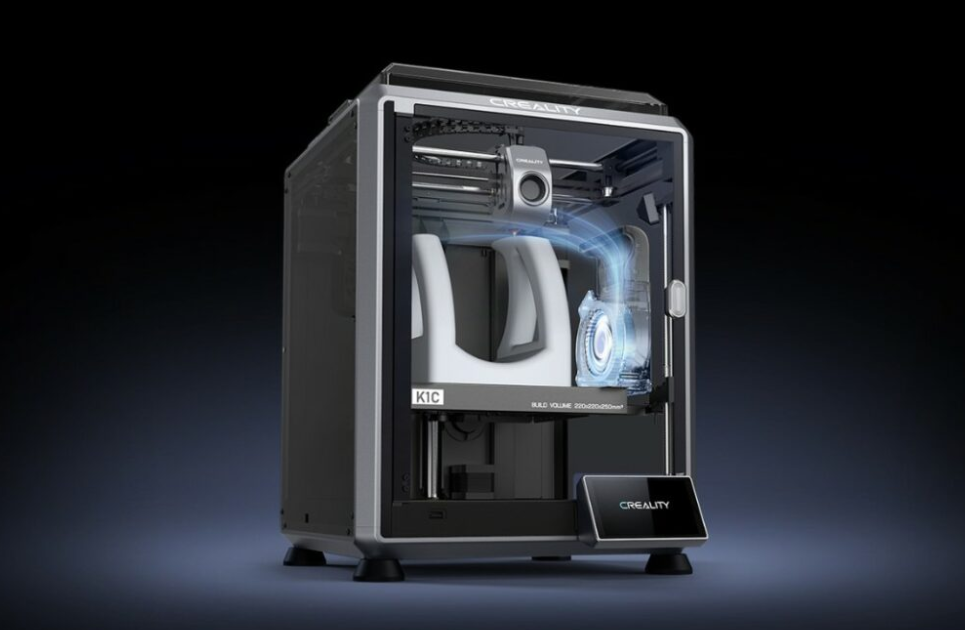
It might be hard to understand technical specs, especially when modern equipment is pushing the limits of speed and materials. The Creality K1C 3D printer seems good on paper, but numbers alone don't always tell you how it works in real life.
This guide breaks those specifications into practical insights so you can understand how they impact everyday printing and long-term usability.
Creality K1C Specifications For Everyday Use
Looking at Creality K1C specifications reveals a system built for speed, automation, and consistency. It uses fused deposition modeling paired with a CoreXY motion system, which allows faster and more stable movements compared to traditional bed slinger designs.
The maximum speed that was promised is 600 mm per second, but in real life, most prints only run approximately 300 mm per second. That range creates a balance between quality and speed, which is why a lot of people remark that the print times are faster without losing any data. It feels rapid not only in marketing but also in real life.
Things run more smoothly when they are automated. Input shaping, auto leveling, and filament identification eliminate the need to make the same modifications over and over again, which used to slow things down. People who post on forums usually comment that this printer doesn't need as many changes between prints as older ones do.
What Creality K1C Build Volume Means For Different Projects
The build volume of the Creality K1C is 220mm x 220mm x 250mm. That size makes it a good medium ground because it gives you options without taking up too much space.
For most people, this amount is plenty to handle common printers like prototypes, functional parts, and ornamental pieces. It cuts down on the need to break models into smaller parts, which can make them weaker or require more steps to put them together. That alone makes things work better in everyday life.
Some people who work on larger objects mention dividing designs into sections, but the printer’s speed helps offset the extra steps. Faster print cycles make multi-part projects less time-consuming than expected.
Small Detailed Models Versus Larger Functional Prints
Small models do better when they have fine control and layer heights that stay the same. The printer lets you make little changes, which helps you get crisp details on miniatures or complex designs.
You need to plan more for bigger prints. Orientation is more important, especially when there are height constraints. Instead of merely focusing on width or depth, people often change the height of models to make the most of the space they have.
Performance Features That Influence Print Quality
There are a number of design options on the K1C 3D printer that affect the quality of the output. These features go beyond just making things look better; they also make sure that lengthier prints are more reliable.
The direct drive extruder is made to keep the filament flow steady and prevent clogs from happening. This is especially helpful when working with materials that are flexible or rough. Many experienced users say that long print sessions are less likely to be interrupted.
Cooling is also very important. Several fans control the airflow over the print, which helps the layers harden quickly while keeping their shape. This makes bridging better and fixes problems like stringing or uneven surfaces.
Speed and Precision Balance
It's important to be consistent, but speed is also important. The printer can go quite fast, however, usually users change the settings based on the project. Faster prints are good for drafts or prototypes, but slower rates make details better for finished models.
The CoreXY framework helps keep things stable when they move quickly. It cuts down on visual artifacts like ringing when used with input shaping. People generally say that the motion mechanism is smooth, even when it is going faster.
When speeds are lower, it's easier to observe the details, especially in intricate designs. The printer can handle both speedy prototyping and high-quality output without needing to make large changes because it is so flexible.

Temperature Control and Material Support
The printer can handle a wide range of materials because it can manage the temperature. It can use a lot of different filaments because its hotend can get up to 300 degrees Celsius.
People often use these materials:
- PLA and PETG for printing that can be used for many things
- ABS and ASA are strong and can handle heat
- TPU for pieces that need to bend
- Filaments packed with carbon fiber for strength in structures
The design inside keeps everything steady, which helps them stick together and stops them from warping. People who work with complicated materials typically report that they achieve more consistent results when they use closed frame setups.
How These Specifications Affect Real Printing Experience
Specifications make sense when they make things easier. The Creality K1C 3D printer is easy to operate, yet it doesn't take away control from people who know how to use it. Setup is one of the best things that has changed. The printer is mostly put together, and the guided startup process makes it easy for most people to start printing in only a few minutes. That gets rid of a big problem that people often have with 3D printing.
Dependability is just as vital. Features that help identify filament runout and recover from power loss lower the number of unsuccessful prints. The AI camera that comes with it provides another level of monitoring, letting individuals check on progress from a distance and spot problems early.
The level of noise depends on the settings. Standard operation sounds like other computers that are closed off, but silent mode makes the noise far less noticeable. Some people say that the enclosure itself helps keep sound in, making it good for places where people share space.
Who Benefits Most From These Features
The specifications of the Creality K1C appeal to a wide range of people; some users get more out of its design. Beginners find value in automation. Features like auto calibration remove early frustration, allowing focus on learning design and slicing rather than troubleshooting hardware issues.
Flexibility is good for people who have used it before. Being able to work with more modern materials and higher speeds makes it possible to do more complicated tasks. Some people even look into customizing the firmware because the system is open.
Small-scale designers and prototypers like things to stay the same. It is easier to make changes to designs or build several parts without having to constantly check on them when the turnaround times are faster and the output is trustworthy.
Frequently Asked Questions
What Does the Creality K1C Build Volume Support In Real Use?
It handles most prototypes, household items, and medium-sized functional parts without requiring model splitting.
Is the K1C 3d Printer Suitable For Beginners?
Yes, automation features simplify setup and reduce manual adjustments, making it easier to get started.
How Fast Is the Creality K1C 3D Printer In Everyday Printing?
Most printers go about 300 mm per second, which is a good mix between speed and quality.
Can The Creality K1C Handle Advanced Materials?
It supports materials like ABS, TPU, and carbon fiber-filled filaments due to its high temperature capability.
Does the Enclosure Improve Print Results?
Yes, it keeps the temperature stable, which helps keep things from warping and makes the print more consistent overall.
Specifications may appear good on paper, but what really matters is how they make things easier and better. Creality makes the K1C feel easy to use while being powerful by turning technical features into useful benefits without introducing further complexity.
Anyone considering this printer can benefit from checking Creality Promo Codes before purchasing, as pricing and offers often change.
Follow TrendyTempo for more technology insights and product breakdowns that help you make informed decisions.
Our Top Picks



You Might Also Like









Recent Blogs
-
Your Guide to Pebblebee Tracker Devices and Smart Item Protection
-
Unlock Precision Woodworking with FindBuyTool
-
How Protyre is Making Car Maintenance Faster and Easier
-
A Neutral Look at Unique Vintage and Its Classic Fashion
-
Beste Cadeau voor Moederdag Dat Echt Speciaal Voelt
-
Planning the Perfect Short Trip to Paris
-
Airport Outfit Guide: How to Look Stylish and Stay Comfortable