How the Snapmaker U1 Changes Multi-Color 3D Printing
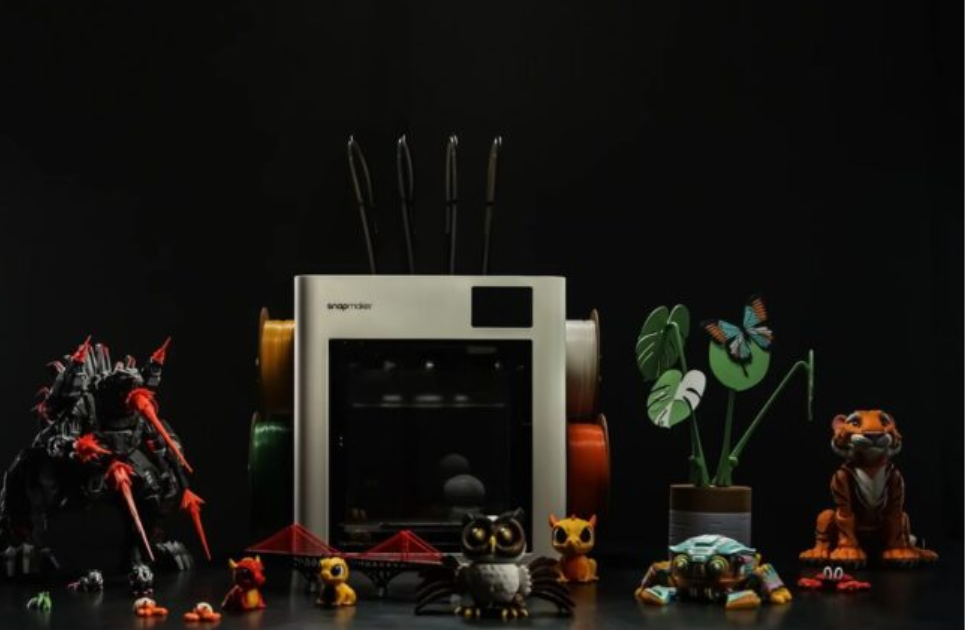
The Snapmaker U1 aims to shift the balance by rethinking how filament switching and multi-material printing are handled. It brings faster, cleaner, and more accessible color 3D printing to a wider audience.
Recent Blogs
-
The Ultimate Guide to Shopping at DoorRinger – Elevate Your Home Security with Smart Technology
-
Explore Premium Cannabis Products with Botany Farms
-
Why Underground Printing Is Ideal for Custom Apparel
-
Top Vitamins Essential for Healthy Hair Growth
-
Dad Gang Co. – Celebrating Fatherhood with Style
-
Check Out the Most Reliable Welding Helmets for Any Job
-
Stay Active Using LifeSpan Desk Treadmill
By Admin
·April 26 23
Multi-color 3D printing didn’t start as the flexible process you see developing today. For a long time, most 3D printers relied on a single extruder, which meant they could only print one color or material at a time. If someone wanted a different color, they had to pause the print manually, swap the filament, which was slow, messy, and often disrupted the print's flow.
Recently, machines like the Snapmaker U1 3D printer are trying to solve these exact pain points more smartly. Instead of relying on constant filament purging or complex multi-extruder calibration, it uses a tool-changing approach where different print heads can be swapped quickly during a print. Let’s take a look at the Snapmaker U1.
What Makes Snapmaker U1's Improved Multi-Color Printing
The Snapmaker U1 is designed with a simple goal: to make multi-color and multi-material 3D printing easier, cleaner, and more efficient. Its tool-changing system with dedicated print heads reduces waste and streamlines color changes, making the whole printing experience feel more straightforward and less technical.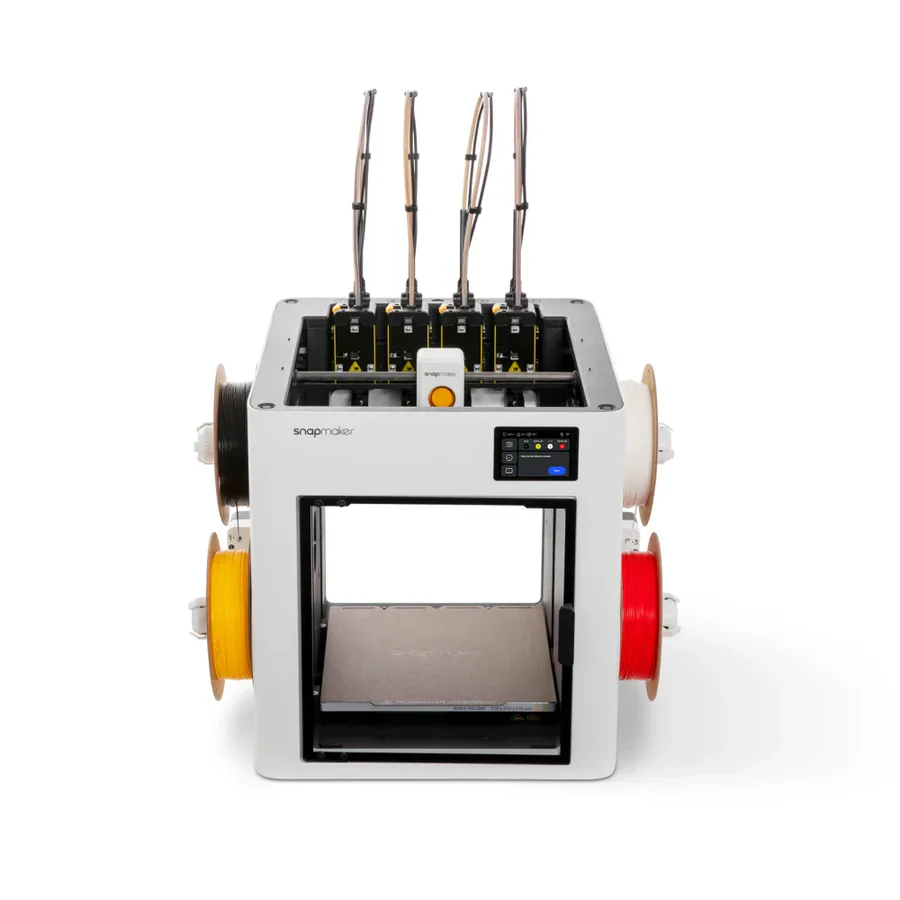
It also fits into Snapmaker’s broader modular ecosystem, where hardware and software work together as one system. Through Snapmaker’s slicer and app tools, users can manage prints, calibrate settings, and monitor progress more easily, making the U1 part of a connected workflow designed to scale from simple prints to more advanced multi-material projects.
Features of Snapmaker U1
Here are some of the features that make the Snapmaker U1 different from traditional printers..
4-Toolhead SnapSwap™ System
The Snapmaker U1 uses a 4-toolhead system that lets it switch between different filaments quickly during a print. This makes multi-color and multi-material printing smoother while significantly reducing waste from purging.
High-Speed CoreXY Printing
It is built on a CoreXY motion system capable of high-speed printing (up to around 500 mm/s), allowing faster production without sacrificing precision or detail quality.
Multi-Material and Multi-Color Support
The printer can handle multiple materials in a single print, including combining rigid and flexible filaments, enabling more complex and functional designs.
Automated Calibration System
The U1 includes automatic calibration, toolhead alignment, and vibration compensation, helping improve print accuracy and reducing the need for manual setup.
Smart Filament Management
It features RFID-based filament detection, auto-loading, and backup spool handling, making filament use more automated and user-friendly.
Integrated Software Ecosystem
The printer works with Snapmaker’s slicer and app, allowing users to control, monitor, and manage prints remotely while keeping the workflow simple and connected.
Pros and Cons of Snapmaker U1
Here are some of the pros and cons of Snapmaker you need to know..
Pros of Snapmaker U1
-
Fast 4-toolhead SnapSwap system for efficient multi-color printing
-
Low filament waste compared to traditional purge-based systems
-
High-speed CoreXY printing (up to 500 mm/s)
-
Strong automation features (auto-calibration, vibration compensation)
-
Easier multi-material printing workflow
-
Integrated software and app control for better usability
Cons of Snapmaker U1
-
Learning curve for multi-toolhead system setup and workflow
-
Advanced features may require time to fully optimize and understand
-
Accessories and add-ons may increase the overall cost
FAQs
Does the Snapmaker U1 Reduce Filament Waste During Color Changes?
Yes. One of its key improvements is minimizing purge waste during filament switching, which is a common issue in most multi-color 3D printing systems.
Can the Snapmaker U1 Print with Multiple Materials, Not Just Colors?
In many multi-material setups like this, users can combine different filament types, such as flexible and rigid materials, expanding functional use cases beyond aesthetics.
Is Special Software Required to Use Multi-color Features?
Yes, multi-color printing usually requires compatible slicing software that can assign different colors or materials to specific parts of a model, but Snapmaker integrates this into its ecosystem for easier use.
The Snapmaker U1 marks a clear step forward in multi-color 3D printing by making the process simpler, faster, and far less wasteful than traditional systems. Instead of dealing with complicated setups and excessive filament purge, users get a more streamlined experience. It focuses on efficiency and usability, making it a strong option for both beginners and experienced makers who want more creative freedom without added complexity. You can even get a Snapmaker discount code for discounted shopping.
Stay tuned to TrendyTempo for more updates on Snapmaker.
Our Top Picks










Recent Blogs
-
The Ultimate Guide to Shopping at DoorRinger – Elevate Your Home Security with Smart Technology
-
Explore Premium Cannabis Products with Botany Farms
-
Why Underground Printing Is Ideal for Custom Apparel
-
Top Vitamins Essential for Healthy Hair Growth
-
Dad Gang Co. – Celebrating Fatherhood with Style
-
Check Out the Most Reliable Welding Helmets for Any Job
-
Stay Active Using LifeSpan Desk Treadmill